
Messaging options, workflow, and risk
How to send automated messages on LinkedIn: options, workflow, and risks
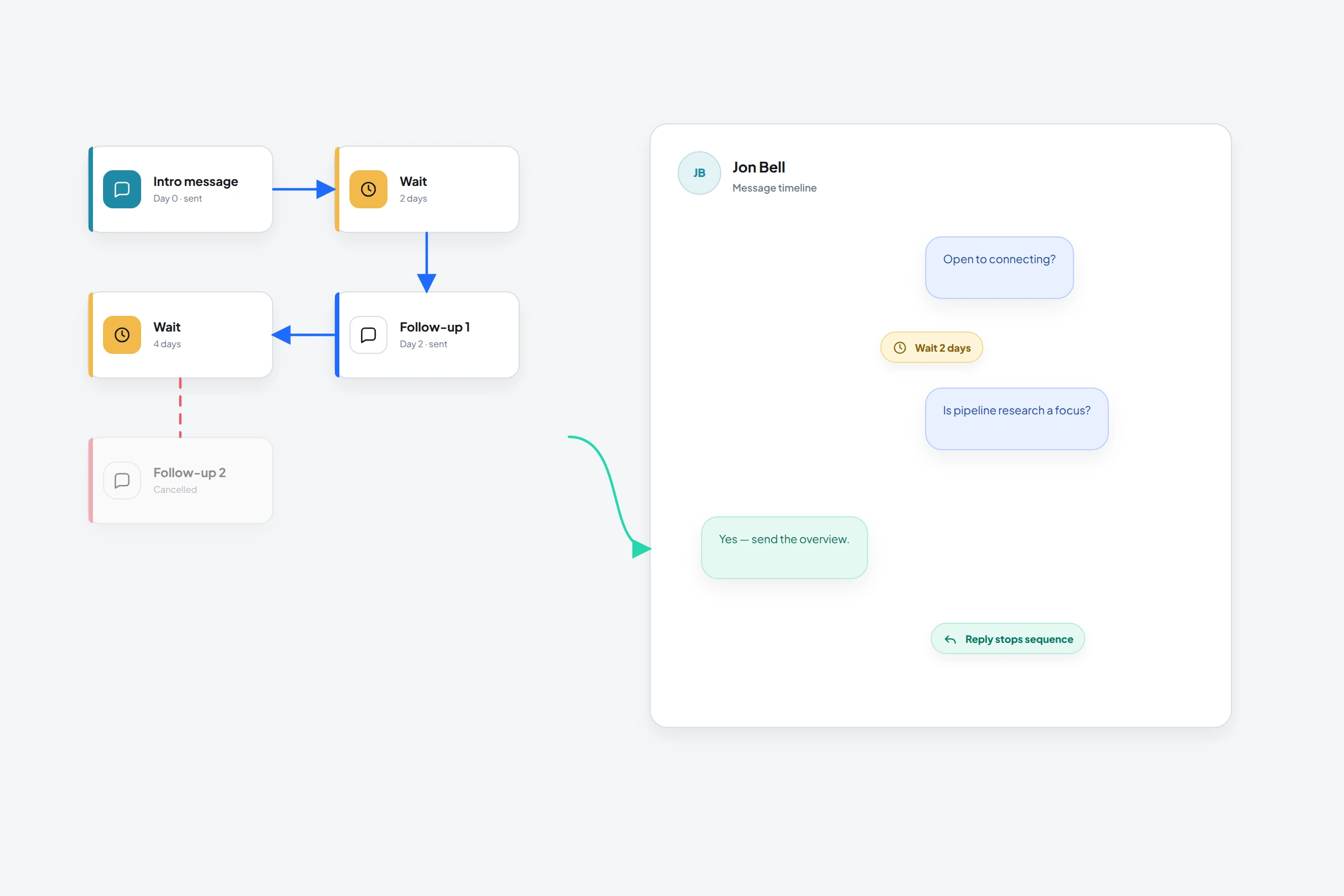
LinkedIn message automation uses software to send an opener or follow-up when a rule is met. Before setting up a sequence, check whether the recipient is already a connection, what you have actually discussed, and who will handle the reply. A pending invitation is not permission to send a first-degree message.
This guide separates LinkedIn's native messaging routes from OutreachGenie's external workflow, then walks through a reviewed Message sequence with timed follow-ups and a human handoff after a detected reply. LinkedIn prohibits unauthorized message automation and can restrict an account for using it. A well-written message does not remove that risk.
01
Native messaging is not the same as an automated sequence
LinkedIn's messaging routes determine who you can contact. An external sequence determines when software attempts an action. They are separate decisions: having access to InMail or Open Profile does not make those routes available in every automation tool. OutreachGenie's Send message and Message sequence actions use first-degree messages. Neither is an InMail sender or an out-of-office autoresponder.
02
Choose the route before you design the sequence
- 01
First-degree message
Use LinkedIn Messaging for an existing connection. LinkedIn says these messages are free, and OutreachGenie's Send message and Message sequence actions are designed for this state.
- 02
Open Profile message
A Premium member may enable Open Profile so people outside their network can contact them. Availability belongs to the recipient's LinkedIn settings, not to a sender's automation configuration.
- 03
Message request
LinkedIn allows requests in limited shared contexts such as a Group or current workplace. The recipient can accept or decline, and LinkedIn may limit a member's ability to send them.
- 04
InMail
InMail is a paid LinkedIn route for contacting some non-connections. It uses subscription credits and is not the same action as a direct message to a first-degree connection.
- 05
Third-party workflow
An outside tool may arrange waits, state checks, and sends, but LinkedIn says unauthorized message automation is prohibited. Evaluate that risk separately from whether the copy or sequence looks reasonable.
03
Build the external workflow around connection state
If the account owner decides to evaluate a third-party workflow despite LinkedIn's rule, the sequence should still represent the relationship truthfully. A pending invitation is not a connection. Acceptance opens first-degree messaging, but it does not establish interest in a pitch. A reply changes the work from scheduled outreach to a real conversation.
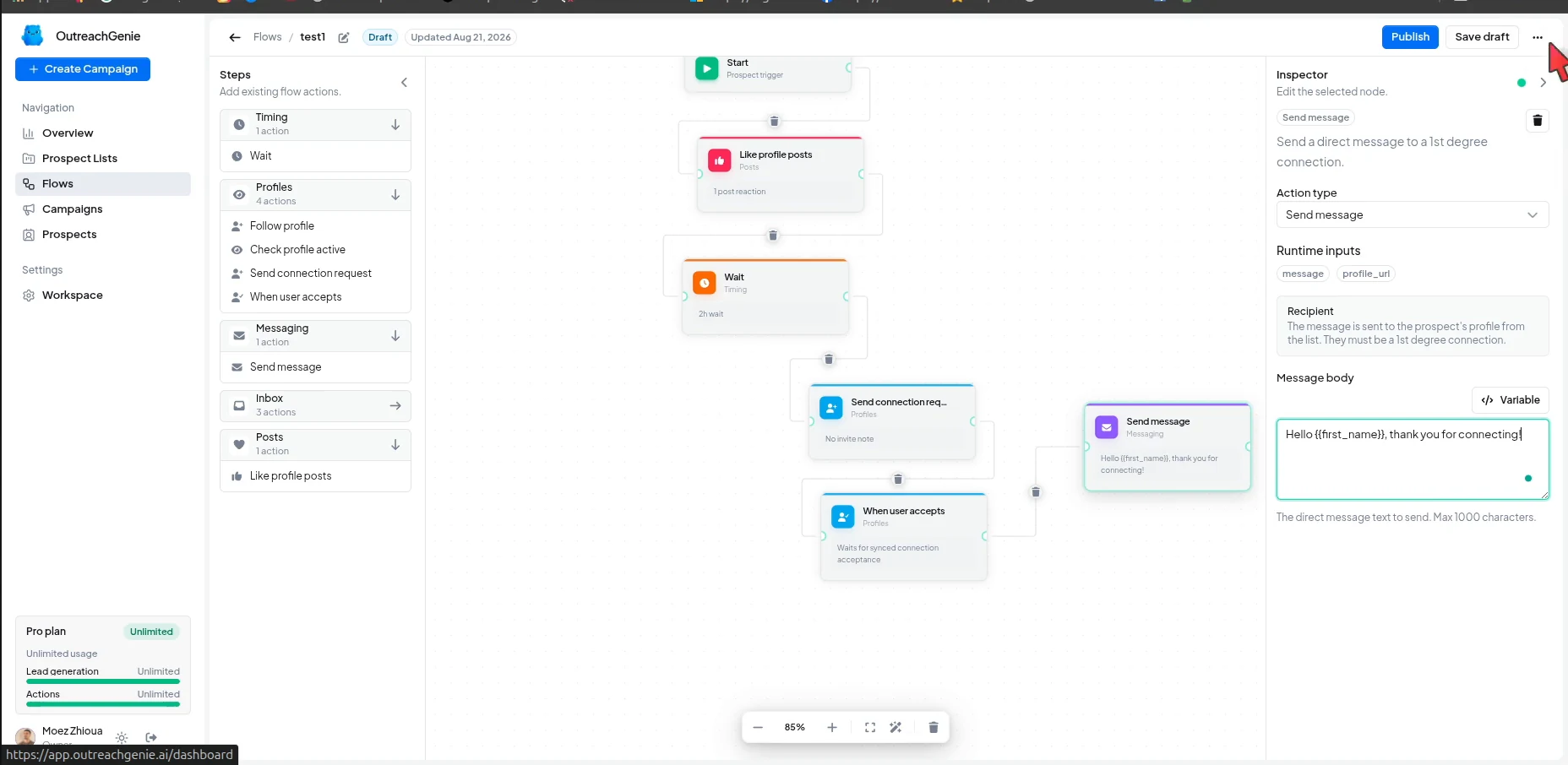
OutreachGenie exposes those states as separate actions. When user accepts waits for synced connection status. Send message sends one message. Message sequence groups an initial message with timed follow-ups and checks for replies when each follow-up delay ends. A tracked or detected reply stops that prospect's sequence. A standalone Check reply inspects the conversation, then the runtime schedules the next node automatically. It has no manual review gate or automatic replied/no-reply branch. Use Message sequence for reply-aware follow-ups instead of relying on a person to intervene between linear steps.
- 01
Classify the relationship
Separate existing connections, pending invitations, eligible non-connections, and people who should not be contacted. Do not make the send step guess.
- 02
Wait for a real state change
If the route depends on a connection request, use acceptance state rather than assuming that a calendar delay means the person accepted.
- 03
Review the Message sequence
Add Message sequence in the flow editor. Review each Message body against the recipient and source context. The first message has no sequence delay. Set Wait before sending for each later message, choosing Seconds, Minutes, Hours, or Days. The sequence supports two to ten messages; use Add message only when another follow-up has a clear purpose.
- 04
Use the built-in reply stop
After a follow-up delay ends, Message sequence checks for a reply before the next send. A tracked or detected reply stops that prospect's sequence, including before the initial message if a reply is already tracked. This depends on reply detection and does not promise immediate cancellation of a message already in flight. Separate Send message and Check reply steps do not provide a review checkpoint. To interrupt an active campaign for review, use Pause campaign or Stop campaign in campaign settings and confirm the paused or stopped status. These are campaign-wide controls, not a per-prospect stop; an action already in flight may still complete.
- 05
Hand the conversation to a person
Questions, objections, declines, and referrals need a response to what the member actually wrote, not the next scheduled template.
04
One message should earn one next decision
The first message after acceptance is where an otherwise careful sequence often reveals its real priority. A long pitch sent immediately after the connection makes the invitation look like a delivery mechanism. A useful first message continues the reason for connecting and asks for a small, answerable response.
Write for the evidence you have. If a post comment introduced the person, continue that subject. If the connection came from an event, name the shared context. If all you know is a title, research before claiming a problem. Personalization is not the insertion of a first name; it is the preservation of a real reason to write.
- State why this conversation is relevant now
- Use context that a reviewer can verify
- Give the message one purpose and one answerable question
- Leave out the calendar link unless the prior exchange supports a meeting
- Read the message aloud and remove anything you would not say directly
05
A follow-up example with a clear stopping point
Illustrative scenario: a new connection commented that their team loses track of approvals between sales and delivery. You sell handoff software, but you have not established whether they are evaluating a tool. The comment supplies a topic to discuss, not a buying signal.
First message: “Thanks for connecting, Sam. In your comment about project approvals, you mentioned that ownership gets unclear after the sale. Does that happen before the kickoff or once delivery has started?” Use this only when the underlying comment is real and you have checked what the person said.
If there is no reply, a later message needs something more useful than “just checking in.” For example: “One thing you can check without changing tools: take the last delayed project and find the first approval with no named owner. Was the owner missing from the start, or did responsibility change?” Do not send it if the original context does not support it.
- A substantive reply: Message sequence stops that prospect's sequence when the reply is tracked or detected; answer the actual question manually.
- A decline or request for no further messages: stop contact; do not turn the objection into another scheduled pitch.
- No reply after the useful follow-up: stop this example sequence. Silence does not establish interest.
- An unreadable or stale conversation state: use Pause campaign or Stop campaign for campaign-wide review rather than treating an unknown state as no reply.
06
Pacing controls do not grant permission
Advice about message automation often begins with daily caps, randomized delays, or activity that appears human. Those settings may change throughput. They do not change LinkedIn's rule against unauthorized automation, and they should never be presented as a way to avoid detection.
The account owner remains responsible for the activity. LinkedIn reserves the right to limit how members connect and communicate, and it can restrict, suspend, or terminate an account for misuse or a breach of the agreement. A warning or restriction is a stop condition, not a prompt to adjust the timing and try again.
- A lower daily count is still third-party automation if an outside tool performs the send
- A random delay changes timing, not authorization
- More natural wording does not change how the action was executed
- Accurate targeting reduces irrelevant messages but does not make a prohibited tool permitted
- Do not bypass a warning, access control, or use limit
07
End the workflow when the evidence changes
A later message is justified only when something supports it: the member accepted, asked a question, or did not reply and the follow-up contributes one useful piece of information. The passage of time by itself is weak evidence. One unanswered follow-up may be enough; a chain of reminders usually says more about the sender's schedule than the recipient's needs.
The governing decision is simple. Use the LinkedIn-native route that matches the relationship. If you consider an external workflow, make the policy and account risk explicit, constrain Send message and Message sequence to first-degree connections, review the copy, and treat any reply, decline, warning, or restriction as a reason to stop.
Common questions
Questions that come up in practice
Can LinkedIn messages be automated?
LinkedIn provides native messaging routes and, for some Premium users, an AI drafting feature. Third-party software that performs message sends is different. LinkedIn says unauthorized automated methods that send or redirect messages are prohibited and can put the account at risk.
How can I message someone who is not a connection?
LinkedIn may allow an InMail, an Open Profile message, or a message request for an eligible Group member or current coworker. Each route has its own eligibility and limits. OutreachGenie's Send message and Message sequence actions use first-degree messages.
Can OutreachGenie wait until a LinkedIn invitation is accepted?
Yes. The When user accepts flow action waits for synced connection state before allowing the accepted branch to continue.
Can OutreachGenie send a message to someone who isn't connected?
Send message and Message sequence are designed for first-degree connections. InMail, Open Profile messages, and message requests are different LinkedIn routes and should not be treated as the same action.
Does a reply check automatically stop every later message?
Message sequence stops that prospect's sequence on a tracked or detected reply and checks before delayed follow-ups. Standalone Check reply has no manual review gate or automatic replied/no-reply branch; completion schedules the next node automatically. Detection does not guarantee immediate cancellation of a message already in flight. A person should handle the reply.
Do randomized delays or daily limits make automation compliant?
No. Pacing settings change when or how often an action runs. They do not turn unauthorized third-party automation into activity permitted by LinkedIn, and they should not be used to evade detection or bypass a platform limit.
What should stop an automated messaging workflow?
Stop when the member replies, declines, objects, asks not to be contacted, or when LinkedIn presents a warning or restriction. A real conversation should move to manual handling.
Can I stop just one prospect from the campaign panel?
There is no per-prospect stop control in the campaign prospect panel. Use Message sequence for reply-aware follow-ups. To interrupt an active campaign for review, use Pause campaign or Stop campaign in campaign settings and confirm the paused or stopped status. These controls affect the entire campaign, and an action already in flight may still complete. Review pending outreach before resuming; resuming does not add a reply guard to standalone Send message steps.
Research used for this guide
Try the workflow