
Message sequence and reply detection
How to stop LinkedIn follow-ups when someone replies
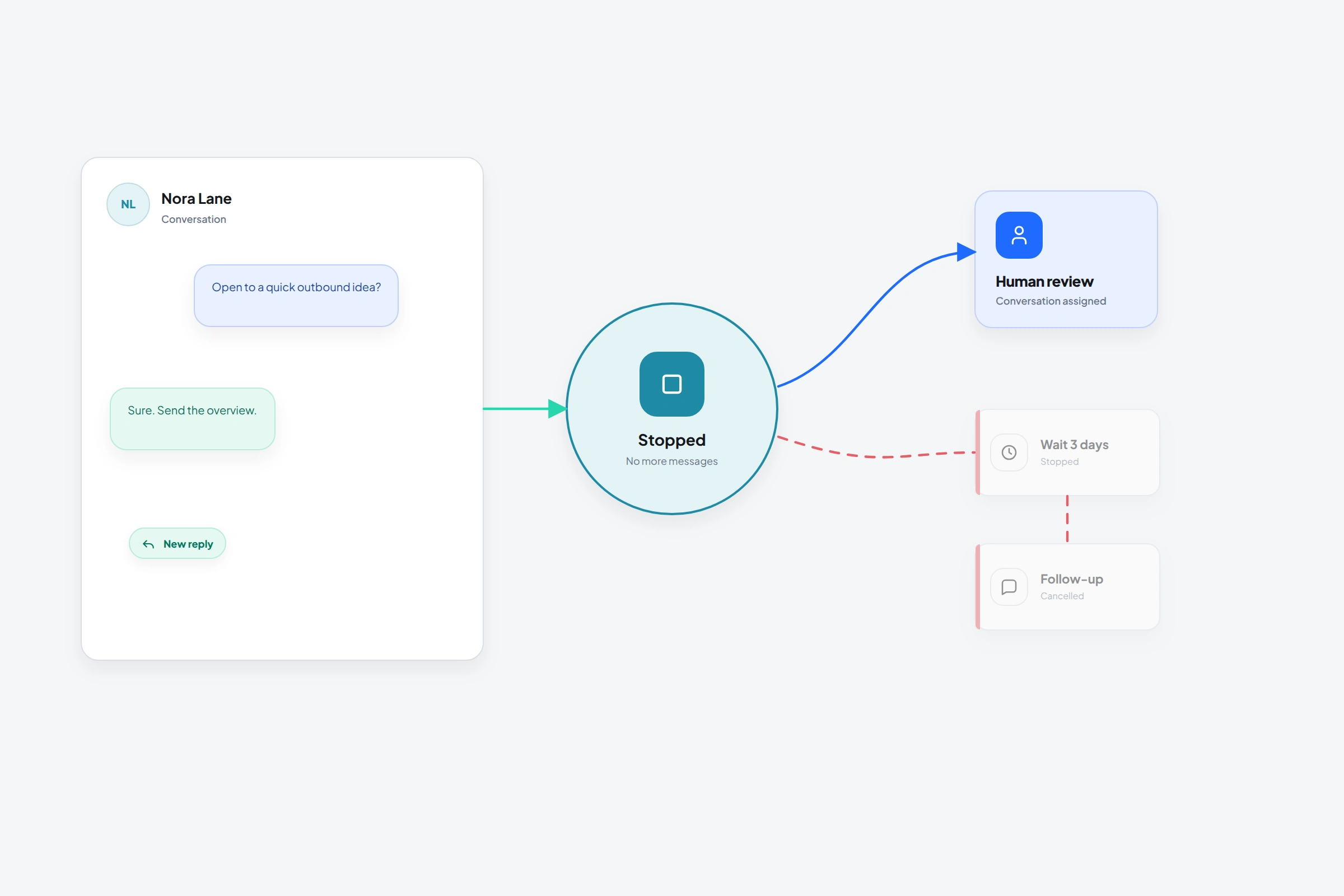
A follow-up after someone has answered can make a real conversation feel ignored. OutreachGenie's Message sequence groups an initial message with timed follow-ups and stops that prospect's sequence on a tracked or detected reply. A person then handles the response.
The stop depends on tracking or detecting the reply. It does not guarantee immediate cancellation of a message already in flight, and it does not automatically stop unrelated flows. LinkedIn's rule against unauthorized automation and the risk of account restriction still apply.
01
Choose Message sequence for timed follow-ups
Message sequence is the flow action for an initial message followed by delayed messages. It checks for replies when a follow-up delay ends. A tracked or detected reply ends that prospect's sequence rather than sending the next template. A reply already tracked for the campaign prospect can also stop the initial message.
Send message is a single-message action. Check reply is a separate action that detects whether the member has responded. Standalone Check reply has no manual review gate or automatic replied/no-reply branch: completion schedules the next node automatically, so a later Send message can run before anyone reviews the result. Use Message sequence for reply-aware follow-ups instead.
02
Set up the sequence and human handoff
- 01
Verify the connection
Message sequence uses first-degree messaging. Confirm the prospect is connected; if an invitation is pending, put When user accepts before the sequence and wait for synced acceptance. A fixed wait does not prove acceptance. InMail, Open Profile messages, and message requests are different routes.
- 02
Review the initial message and follow-ups
Add Message sequence in the flow editor. Review each Message body and its variables against the prospect's actual context. The sequence supports two to ten messages; Add message adds another entry. The first message has no sequence delay.
- 03
Set each follow-up delay
Use Wait before sending on each later message and choose Seconds, Minutes, Hours, or Days. Each delay follows the preceding sequence message. When it ends, the sequence checks for a reply before attempting the follow-up; delivery still depends on runtime availability and campaign controls.
- 04
Check the outcome and take over
A tracked or detected reply stops that prospect's sequence. Review the prospect record and campaign activity, assign a person to answer, and respect declines or requests for no further contact. If conversation state is missing or stale, use Pause campaign or Stop campaign in campaign settings and confirm the paused or stopped status before reviewing. These controls affect the entire campaign. Stopping cannot guarantee immediate cancellation of a message already in flight.
03
Keep reply detection's limits visible
- The stop depends on a tracked or detected reply for the correct prospect and conversation.
- A reply check from several days ago can be stale; Message sequence checks when each follow-up delay ends.
- Separate Send message and Check reply steps do not wait for a person to approve the next action.
- Stopping one prospect's sequence does not promise to stop unrelated flows or every other outreach action.
- A message already in flight may still complete; review activity before sending a manual response.
- Delays and reply stops do not make unauthorized LinkedIn automation permitted or guarantee freedom from account restrictions.
04
Make the human handoff visible
A stopped sequence is not a completed sales process. The reply needs an owner, context, and a timely response. Use the prospect record and campaign activity to see what happened before continuing manually.
Questions, objections, referrals, and polite declines all change the conversation. Answer what the member actually wrote instead of resuming the scheduled template. A request for no further contact means stop contact, not just this sequence.
Common questions
Questions that come up in practice
Can OutreachGenie detect LinkedIn replies?
Yes. Message sequence checks for replies before timed follow-ups and stops that prospect's sequence on a tracked or detected reply. OutreachGenie also has a standalone Check reply action, but its completion schedules the next node automatically rather than waiting for manual review. The stop depends on reply tracking or detection for the correct conversation.
Where should the reply check go?
Message sequence runs its reply check when each follow-up delay ends. Use it for reply-aware follow-ups. A standalone Check reply has no manual review gate or automatic replied/no-reply branch: the runtime schedules the next node automatically, including a later Send message. Do not rely on reviewing the result between linear steps.
Should a negative reply stop follow-ups?
Yes. A tracked or detected reply stops that prospect's Message sequence whether it is positive or negative. Handle the response manually and respect a decline or request for no further contact.
Does a reply cancel a message already being sent?
Do not assume immediate cancellation. A message already in flight may complete before a reply is tracked or detected. Review campaign activity before answering manually. The built-in stop applies to that prospect's Message sequence, not arbitrary flows or all outreach actions.
Can I stop just one prospect from the campaign panel?
There is no per-prospect stop control in the campaign prospect panel. Use Message sequence for reply-aware follow-ups. To interrupt an active campaign for review, use Pause campaign or Stop campaign in campaign settings and confirm the paused or stopped status. These controls affect the entire campaign, and an action already in flight may still complete. Review pending outreach before resuming; resuming does not add a reply guard to standalone Send message steps.
Research used for this guide
Try the workflow