
LinkedIn InMail vs connection request: which should you use?
Contact route and outcome comparison
A prospect has announced a project you can help with. You have an InMail credit and a Connect button. Sending both would give you two attempts, but it would also put two approaches in front of the same person before you know whether either is welcome.
Use a connection request when there is a real reason to join each other's network. Consider InMail when you need to explain a relevant matter to someone outside that network and LinkedIn offers the paid route. For an existing connection, use an ordinary message. Check Open Profile and other eligible message routes before deciding that a paid subscription is necessary.
Neither choice establishes interest in your offer. The useful comparison is how many appropriate conversations each route creates from the people you selected, including those who never accept or reply.
What changes when you choose InMail?
A connection request asks someone to become a first-degree connection. InMail lets you message an eligible nonconnection without first receiving that acceptance. Paid InMail requires an eligible subscription and credits; recipients can choose not to receive it. LinkedIn's InMail documentation describes those access rules.
LinkedIn's messaging guide covers first-degree messages and the eligible nonconnection routes. Open Profile allows free contact to members who enable it, but LinkedIn still limits how many such messages you can send. A Premium badge alone does not establish that this route is available.
An invitation note is also not the same as an ordinary first-degree message. LinkedIn says a recipient can reply to the note without accepting the invitation. If that happens, read the actual conversation; do not treat a reply as proof that the connection was accepted. See its personalized-invitation guidance.
| What you know about the person | Route to review | What still needs checking |
|---|---|---|
| You are already connected | Ordinary LinkedIn message | Existing conversation, relevance and any request to stop |
| You know them and have a reason to stay connected | Connection request | Whether an invitation is appropriate and available |
| They have enabled Open Profile | Free Open Profile message | Whether LinkedIn currently offers that route and allows another message |
| You share an eligible Group or workplace context | Message request, where available | LinkedIn's eligibility and the reason for contacting them |
| They are outside your network and no suitable free route is available | Paid InMail, if available | Recipient preferences, account credits and a worthwhile reason to write |
| The only reason is that they fit a broad job-title filter | More research | A channel cannot supply the missing relevance |
Let the reason for contact decide the first step
Suppose you met an operations manager at an industry roundtable and agreed to stay in touch. An invitation can state that context. There is a relationship to continue, and the request has a purpose beyond opening a sales channel.
Now suppose a different manager has publicly asked for examples of a problem your team has solved. You have a specific answer but no connection. An available Open Profile message or appropriate InMail can carry that answer without waiting for an invitation. The reason is the relevance of the answer to their request, not the seniority of their title.
These are illustrative situations, not observed customer results. They show why a rule such as “always invite first” is too broad. LinkedIn itself recommends inviting people you know and trust. A large searchable audience does not make every person an appropriate invitation recipient.
Before writing, record the reason for contact, the chosen route and any previous approach. If a request is already pending, check that history before adding an InMail. Silence does not explain whether someone missed the request, declined to engage or has not visited LinkedIn. It is insufficient evidence for automatically starting another sequence.
A refunded credit can still mean a rejected offer
LinkedIn returns an InMail credit when the recipient accepts, declines or responds within 90 days under its credit renewal rules. A negative reply can therefore improve your credit balance while giving you no sales opportunity.
Record credit use separately from the result of the conversation. “Not interested” belongs in the response count and the appropriate stop decision. It does not belong in positive replies or qualified meetings.
The allowance also depends on the product. LinkedIn currently lists 15 monthly credits for Premium Business and 50 for Sales Navigator Core. Its Sales Navigator documentation gives all Sales Navigator plans the same 50-credit monthly allocation. More expensive Sales Navigator plans do not increase that allowance.
If credits are driving a purchase, first count the suitable people you actually need to contact through paid InMail. Then review the other capabilities in Premium Business versus Sales Navigator. Dividing an entire subscription price by its credits can misstate the cost when you also bought the plan for research features. Treat research and reply-handling time as costs whichever route you use.
Compare the people you started with
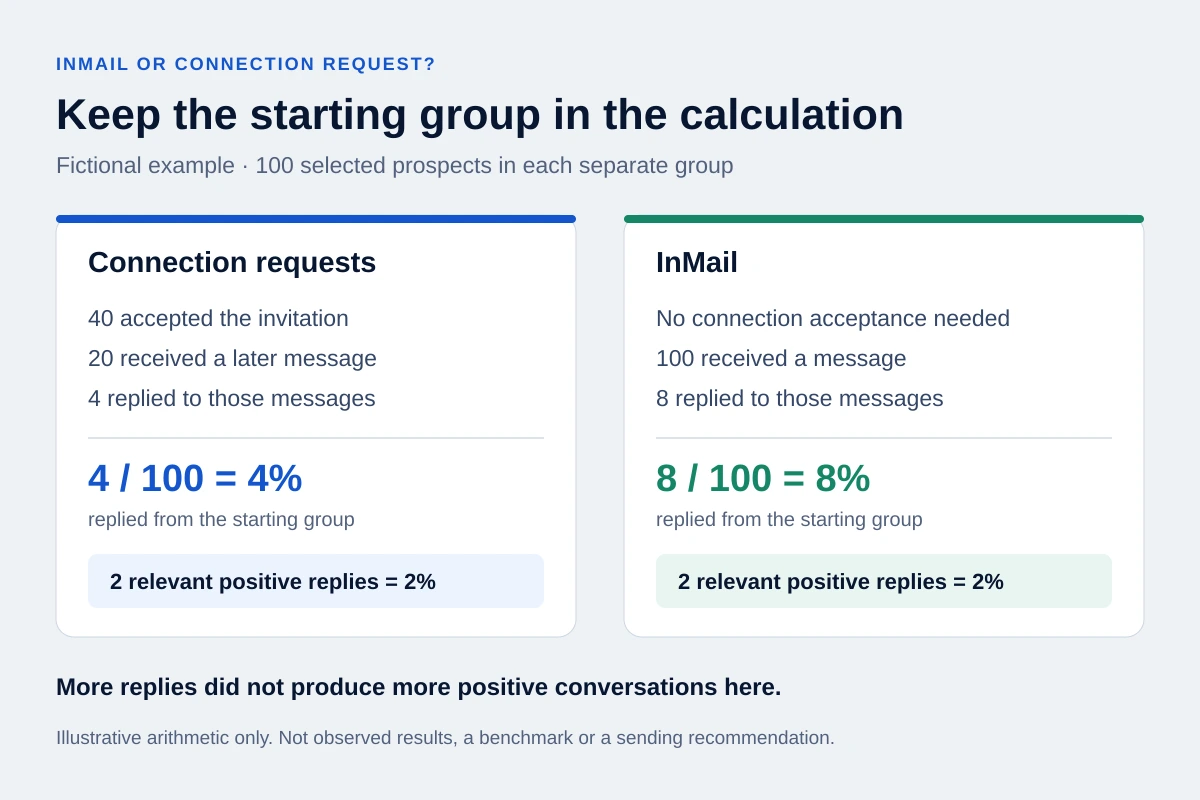
A reply rate among accepted connections excludes everyone who did not accept. Comparing it directly with replies per InMail can make the connection route look stronger merely because a difficult stage has disappeared from the calculation.
Here is a fictional arithmetic example, not a benchmark or a sending recommendation:
| Outcome in the same observation period | Invitation route | InMail route |
|---|---|---|
| People selected at the start | 100 | 100 |
| People who accepted an invitation | 40 | Not required |
| People subsequently sent a message | 20 | 100 |
| People who replied to those messages | 4 | 8 |
| People with a relevant positive reply | 2 | 2 |
Read the result before choosing a winner
On the invitation route, 4 replies from 20 messaged connections is a 20% reply rate. From the original 100 people, it is 4%. InMail produces 8% on that starting denominator. Both produce 2 relevant positive replies per 100 people. Neither the 20% headline nor the 8% headline establishes a better commercial result.
The table also exposes unfinished work: 20 accepted connections have not received a message. That may reflect a deliberate decision or an operating problem. Inspect the reason instead of silently removing them from the report.
For your own comparison, define the eligible group and observation period before sending. Keep the offer, target segment and sender context comparable. Count each person once in the overall result, record cross-channel contact separately, and distinguish declines from positive replies. Include the time spent researching, checking state and answering. If one group consists of familiar contacts and the other of strangers, the result cannot isolate the effect of the channel.
Check limits in the product you actually use
All LinkedIn memberships face invitation limits. Paying for Premium does not make invitations unlimited, and withdrawing pending requests does not remove a restriction. The official invitation-limit page explains those boundaries without supplying a universal safe daily volume.
Some official help pages disagree on details. The newer personalized-invitation page lists three free notes per month; the older InMail and invitation comparison lists five. Check the allowance shown in your account rather than planning around a number copied from a comparison article.
The unanswered-InMail rule also needs care. LinkedIn's general credit page says another InMail requires a response, while its Sales Navigator credit page describes a second unanswered InMail using another credit. Check the current behavior and guidance for your product. Neither statement is a reason to keep contacting someone who has declined.
Where OutreachGenie fits after the choice
OutreachGenie's Send message and Message sequence actions use first-degree messages. They are not InMail or Open Profile senders. Keep paid InMail work in the appropriate LinkedIn product; choosing it does not create an equivalent action in OutreachGenie.
If you choose a first-degree workflow, review connection state before the message. When user accepts waits for synced acceptance; a fixed delay does not establish it. The follow-up workflow guide explains the available actions and reply handling.
LinkedIn prohibits third-party tools that automate activity on its website and can restrict accounts. Contact eligibility and careful message timing do not remove that risk. You can inspect the free OutreachGenie workspace before deciding whether its first-degree workflow fits your process.
Questions that come up in practice
Common questions
Is InMail better than a connection request?
There is no demonstrated universal winner for your audience. Choose an appropriate available route, then compare positive conversations from the original prospect groups over a defined period. An invitation acceptance and an InMail response are different outcomes.
Can I send an InMail without connecting first?
Paid InMail can reach an eligible nonconnection when your account has the required access and credits. Open Profile is a separate free possibility when the recipient enables it. Check the route LinkedIn actually offers.
Should I buy Sales Navigator just for more messages?
Identify a real need for paid InMail before buying an allowance. Sales Navigator's research features may matter more to your work, and its plans currently share the same 50-credit monthly allocation. A larger unused balance does not establish more qualified conversations.
Research used for this guide
- LinkedIn's InMail documentation | LinkedIn Help
- LinkedIn's messaging guide | LinkedIn Help
- Open Profile | LinkedIn Help
- personalized-invitation page | LinkedIn Help
- official invitation-limit page | LinkedIn Help
- general credit page | LinkedIn Help
- Sales Navigator credit page | LinkedIn Help
- InMail and invitation comparison | LinkedIn Help
- prohibits third-party tools that automate activity on its website | LinkedIn Help
Open the workspace and try it with a small, reviewed list.
Try the workflow