
Can you export LinkedIn company-page followers? Options and limits
Page follower reporting and export options
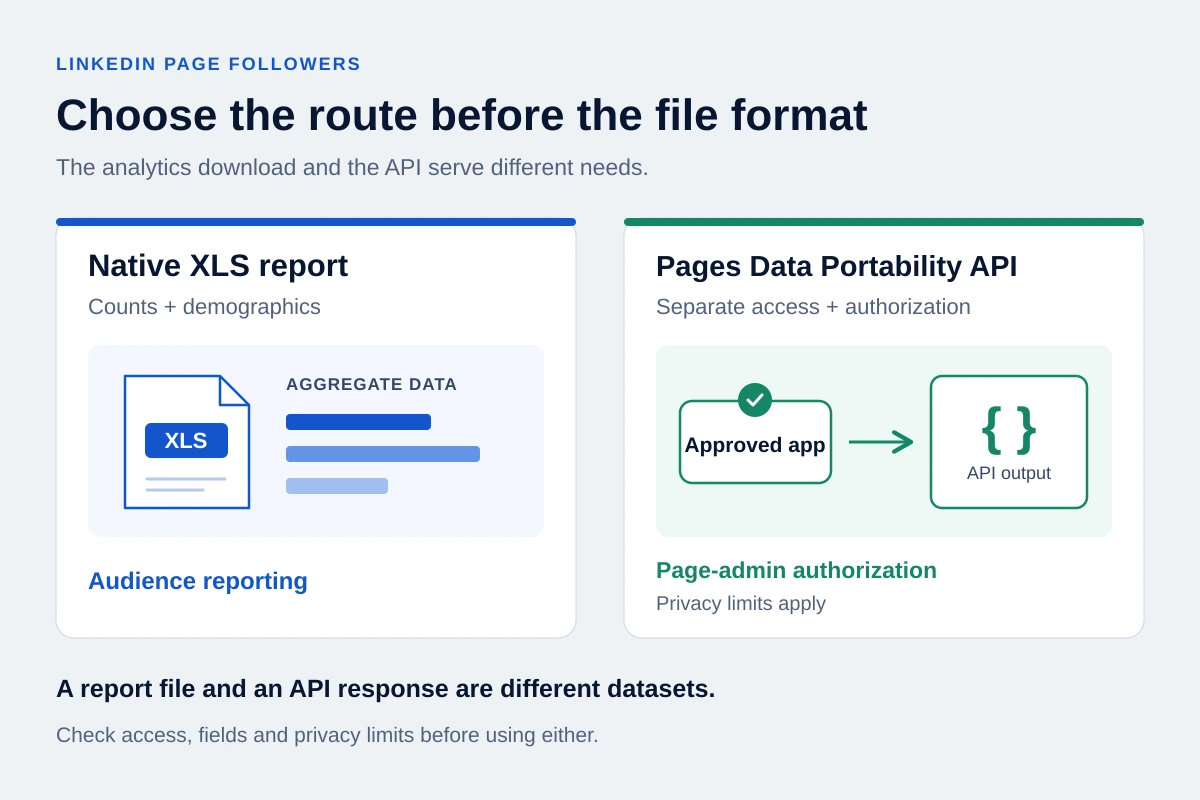
As a Page admin, you can download follower analytics from LinkedIn. A separate official route, the Pages Data Portability API, can return follower data through an approved developer application with Page-admin authorization. Member privacy settings can limit identifying information, so it should not be assumed to provide a complete contact CSV.
We checked OutreachGenie's Page on 16 October 2026. In Analytics → Followers, the All followers section was labelled “Excluded from report.” The ordinary export contained counts and demographic categories. It had no member-name, public-profile-URL or email column.
That distinction matters before you buy an exporter or try to import the download into a CRM. Choose the route by the information you need.
Choose the route by the information you need
| Your task | Where to start | What to check |
|---|---|---|
| Report audience growth or composition | Page analytics export | Reporting period and the workbook's actual sheets |
| Review who follows your Page | The admin view's All followers section | Which people or Pages are visible; viewing is separate from exporting |
| Obtain Page data programmatically | Pages Data Portability API documentation | Developer approval, admin authorization, privacy filtering and returned fields |
| Find relevant leads who follow your own company | Sales Navigator's Following your company filter | Company scope, search filters and any separate export workflow |
What the normal follower report contains
LinkedIn documents an XLS analytics export. From the Page's admin view, open Analytics, choose Followers, then Export and select the reporting period.
Our inspection used 30 September to 14 October 2026. The download contained six sheets:
| Sheet | Information in the report we inspected |
|---|---|
| New followers | Date, sponsored, organic, auto-invited and total follower counts |
| Location | Location and total followers |
| Job function | Job function and total followers |
| Seniority | Seniority and total followers |
| Industry | Industry and total followers |
| Company size | Company size and total followers |
Why visible followers may be absent from the report
This was one Page's report at one point in time. Check your own download before assuming its structure is identical. The inspected file was useful for audience reporting, but it did not identify the people behind those totals.
Saving that workbook as CSV cannot create the missing identities. A row saying how many followers work in an industry cannot become a row for a particular person through a format change.
The All followers view answers a different question. LinkedIn describes a list showing followers, their workplace and when they followed, with People and Pages views. That explains how an admin can see people on screen while the ordinary downloaded report contains aggregate data.
Your personal connection archive is another dataset. Use the LinkedIn connections export guide if you need your own first-degree connections; it is not an export of the company's followers.
A company newsletter has its own newsletter page and subscriber analytics. Use the newsletter-subscriber guide when you need to understand that audience or email-address provenance; the Page follower report does not establish newsletter subscriptions.
The official API route needs separate access
LinkedIn's Page-owner export guidance describes the Pages Data Portability API. Its existence makes “LinkedIn never lets you export follower records” too broad a claim.
It also does not turn the normal Export button into a contact-list download. The developer documentation describes an application and API workflow. An owner evaluating that route should establish these conditions before relying on it:
- Developer access: an application must obtain access to the product through LinkedIn's review process. An ordinary account or Page-admin role alone does not establish that access.
- Page authorization: the developer needs the relevant Page admin's authorization. This is not a general endpoint for anyone's chosen company.
- Member controls: the setting for sharing data with Page owners is off by default. It can prevent member identifiers and other information from being returned.
- Output: the integration must interpret the response and prepare any spreadsheet. Inspect the actual returned fields before treating it as a contact list.
Check returned fields and freshness before a handoff
Microsoft's LinkedIn DMA report describes global availability for Page admins, including outside the EEA. It also records entity verification and good-standing requirements, JSON output and possible delays of up to 48 hours for follower data. Those conditions belong in a provider's explanation of what you will receive.
Ask to see a sample from the specific integration: Which fields are returned, and how are omitted records represented? A LinkedIn member identifier is not automatically a public profile URL. The follows endpoint should not be assumed to return names, job titles or email addresses just because another API can return some profile information.
We have verified the program documentation, not run this API or tested a provider's coverage. Its portability-specific terms also need to be considered before combining or reusing data. Access to a record does not settle every downstream use.
What Sales Navigator adds
Sales Navigator's filter definitions include Following your company. It helps narrow a lead search to followers of your own company. You can then assess whether those people fit the audience you want to review.
The filter does not establish arbitrary access to a competitor's followers, and it is not itself a CSV-export feature. Do not change your stated employer to manufacture access to another company's audience. For the separate question of moving a Sales Navigator list elsewhere, see Sales Navigator lead export options.
Following a company is only one piece of context. An employee, existing customer, potential hire and prospective buyer may all follow the same Page. Their next steps should differ.
When a follower file is ready for list review
If you already have a CSV containing public person-profile URLs, confirm that you can use those records for your intended purpose before importing them. Preserve the source and collection date, then separate relevant prospects from existing customers, employees and records whose identity is unclear.
The free OutreachGenie CSV Checker checks supported profile-URL formats, repeated profile URLs and overlaps with a reference file. It does not retrieve followers, look up the people behind member identifiers, verify that profiles exist, or determine permission to contact them.
OutreachGenie's normal prospect import requires a public LinkedIn profile URL. Review the detected field mapping and row issues before confirming an import. An aggregate Page report cannot satisfy that requirement merely because it has been converted to CSV.
For an outreach list, keep a reason to contact each person beyond “follows our Page.” If the only available evidence is an audience category or an unresolved identifier, stop at reporting or further review.
Questions that come up in practice
Common questions
Is a LinkedIn Page follower report a contact list?
The ordinary report we inspected was aggregate-only, and its source screen explicitly excluded All followers from the report. Inspect your own file's columns. Seeing individual followers in the admin view does not establish that they are included in the download.
Can I use the official API to export a competitor's followers?
The Pages Data Portability route described here requires the relevant Page admin's authorization. It does not provide an unrestricted competitor-audience export. Sales Navigator's own-company follower filter should not be treated as that capability either.
Can OutreachGenie turn the analytics workbook into prospects?
No. The workbook we inspected lacks person-profile URLs. OutreachGenie's file-review and import workflow starts with identifiable person records you already have; it does not reconstruct followers from aggregate counts or operate the Pages Data Portability API for you.
Research used for this guide
- Export your LinkedIn Page analytics report | LinkedIn Help
- Follower analytics for your LinkedIn Page | LinkedIn Help
- Data exports for LinkedIn Page owners | LinkedIn Help
- Pages Data Portability API Overview | Microsoft Learn
- Pages Data Portability API application review and developer support | LinkedIn Help
- LinkedIn DMA Compliance Report, Section 2 Annex | Microsoft
- Sales Navigator lead and account search filter definitions | LinkedIn Help
- Additional Terms for LinkedIn DMA Portability API Programs | LinkedIn
Check a CSV you already have
Next step