
Can you export LinkedIn newsletter subscribers and their emails?
Newsletter subscriber data
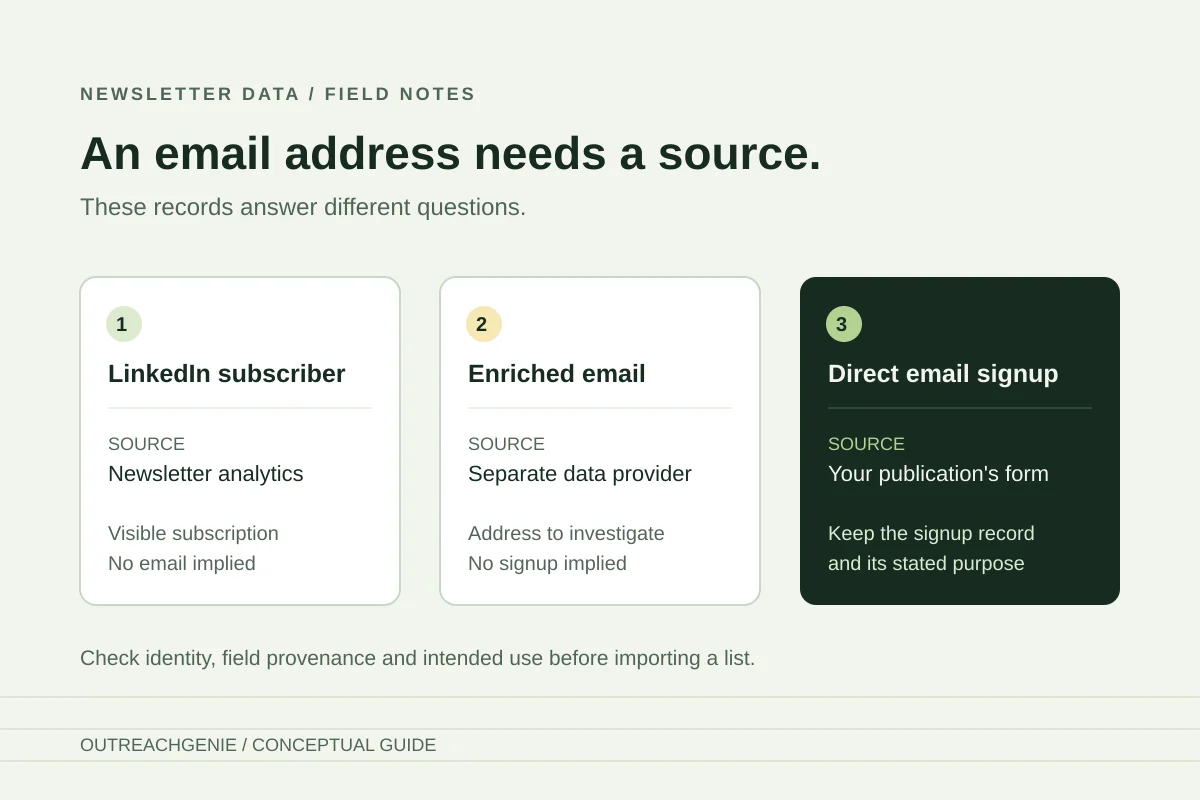
LinkedIn can email your newsletter to subscribers without giving you their email addresses. That is the important distinction when an export tool promises a mailing list: a subscriber profile, an enriched work email and the address used to receive LinkedIn notifications are different pieces of information.
The LinkedIn Help pages reviewed on 16 October 2026 describe subscriber analytics and individual subscriber actions. They do not document a native bulk subscriber CSV or email-list download. That is a limit of the documented workflow, not proof that every API, account or future interface has the same capabilities.
Start with the list you actually need
- See who recently subscribed. Start with New subscribers in your newsletter's analytics. This view does not establish a complete historical export or provide subscribers' email addresses.
- Understand the audience. Review Subscriber demographics for audience characteristics. These summaries are not a person-level contact file.
- Download your own connections. Use LinkedIn's separate account-data archive. A connection record does not establish that the person subscribes to your newsletter.
- Build an email newsletter outside LinkedIn. Use a signup form for that specific email publication. Existing LinkedIn subscribers have not necessarily joined the separate mailing list.
A newsletter published by a company also has its own newsletter page. LinkedIn says this is separate from the company Page itself. Do not substitute the company's follower report for its newsletter subscribers. The company-Page follower guide covers that separate audience.
How to see your newsletter subscribers
For a personal-profile newsletter, LinkedIn's analytics instructions give this desktop route:
- Open Me, then View Profile.
- Find Activity, then Newsletter.
- Select the newsletter and open View analytics.
- Review New subscribers, with the most recent subscribers at the top.
The documented view offers individual follow, connect or message actions. Those options do not show that a subscriber has read an edition, asked for a sales message or supplied an email address to you. Choose any next step from the person's actual context.
The date selector needs particular care. LinkedIn says it applies to Trends and Article totals, but not Subscriber demographics or New subscribers. Selecting the last seven days therefore does not make every section a seven-day cohort. Use the New subscribers metric in Trends for the count in that period; do not label the separate subscriber display as an exported list of that cohort.
These are documentation-based steps. We have not tested a native newsletter-admin export or verified that every account currently displays the same controls.
An email-enriched export has a different source
Some third-party tools advertise subscriber exports with email addresses. Inspect where each field comes from before assuming the file contains the address a reader used on LinkedIn.
For example, Niomaker's LinkedIn Subscribers Exporter advertises a subscriber export and separately lists email enrichment through providers including Apollo, Hunter, Snov and Datagma. That is the vendor's description; we did not install or validate the exporter. It illustrates why “with emails” needs a second question: which system supplied those emails?
An address found through enrichment is not evidence of the person's LinkedIn notification address, newsletter subscription status or agreement to receive your separate publication. A plausible company domain does not resolve those questions.
Before evaluating a file, establish:
- Coverage: which newsletter and collection date it represents, and whether the result is partial.
- Identity: whether each row contains a public person-profile URL rather than a name alone or a Sales Navigator identifier.
- Field provenance: whether an email was supplied by the person, found elsewhere or inferred by an enrichment service.
- Intended use: what the person agreed to receive and whether your email provider accepts that basis.
Keep unknown values unknown. Renaming an enriched-email column to “subscriber email” would conceal the distinction instead of solving it. LinkedIn also restricts certain third-party scraping and automated activity; a vendor's export claim does not establish LinkedIn approval. Review LinkedIn's policy before choosing a collection method.
Why Connections.csv cannot replace a subscriber list
LinkedIn's connections export concerns your connections. LinkedIn says email addresses are included only where the connection has allowed their connections to see or download them.
Even if a newsletter subscriber also appears in that file, the connection record alone does not establish the newsletter relationship. An email present in the archive also does not show that the person requested a different email newsletter. Keep the two sources separate unless you have evidence that connects the records and supports the intended use.
Use the connections CSV guide when exporting first-degree connections is the task you actually need to complete.
Invite readers to the email publication you control
If the goal is an independent mailing list, give subscribers a way to join it directly. LinkedIn's newsletter-management documentation describes LinkedIn distributing new editions through notifications and email. Your own email provider needs its own recipient records and sending basis.
A practical transition can stay small:
- Create a signup page that names the email publication, sender and expected frequency.
- Link to it in a relevant newsletter edition and explain what the reader will receive by joining.
- Use your provider's signup process and retain the subscription record, including confirmation where that process requires it.
- Measure completed subscriptions separately from link clicks and LinkedIn subscriber counts.
For a sourcing newsletter, for example, the invitation could offer a monthly sourcing worksheet by email. It should say that readers are subscribing to that email series; a download button alone can leave the expectation unclear. This is an illustrative publishing plan, not an OutreachGenie campaign or a measured growth result.
Check the destination provider's rules. Mailchimp, for example, requires express, verifiable permission for marketing email. Its requirements are not a universal statement about every provider or jurisdiction. They do make the operational question concrete: can you show why this recipient belongs in this mailing list?
Where OutreachGenie fits
OutreachGenie does not provide a LinkedIn newsletter-subscriber exporter or an email newsletter platform. If you already have a prospect CSV with public LinkedIn person-profile URLs and an appropriate reason to use it, the free LinkedIn CSV Checker can help review URL format, repeated profiles and conflicting rows locally in your browser.
The checker does not obtain subscriber data, enrich emails, verify a live profile or establish subscription permission. A clean file is useful for the separate prospect-import workflow; it is not a replacement for the missing evidence about who subscribed and what they asked to receive.
Questions that come up in practice
Common questions
Where can I see who subscribed to my LinkedIn newsletter?
LinkedIn's personal-profile instructions lead from Me to View Profile, Activity, Newsletter and View analytics. New subscribers shows the newest subscribers first and offers individual follow, connect or message actions. The date range applies to Trends and Article totals, not this subscriber display.
Does a LinkedIn newsletter subscription give me the reader's email?
The reviewed newsletter documentation does not describe an author email-list download. LinkedIn can deliver newsletter notifications itself. If a third-party export contains emails, check their source: enrichment is separate from the address used for LinkedIn notifications and does not establish permission for another mailing list.
Can OutreachGenie export LinkedIn newsletter subscribers?
No. OutreachGenie does not provide a newsletter-subscriber exporter or an email newsletter platform. Its free CSV Checker reviews an existing file's LinkedIn profile URL format, repeated profiles and conflicting rows locally; it does not collect subscriber data or enrich email addresses.
Research used for this guide
- Newsletter analytics | LinkedIn Help
- Newsletter Page on LinkedIn | LinkedIn Help
- Manage a newsletter on LinkedIn | LinkedIn Help
- Export connections from LinkedIn | LinkedIn Help
- LinkedIn Subscribers Exporter: vendor-described enrichment | Niomaker
- The Importance of Permission | Mailchimp
- Automated activity on LinkedIn | LinkedIn Help
Review a prospect CSV you already have
Next step