
Agency automation purchase
Cloud vs browser extension LinkedIn automation: which should an agency buy?
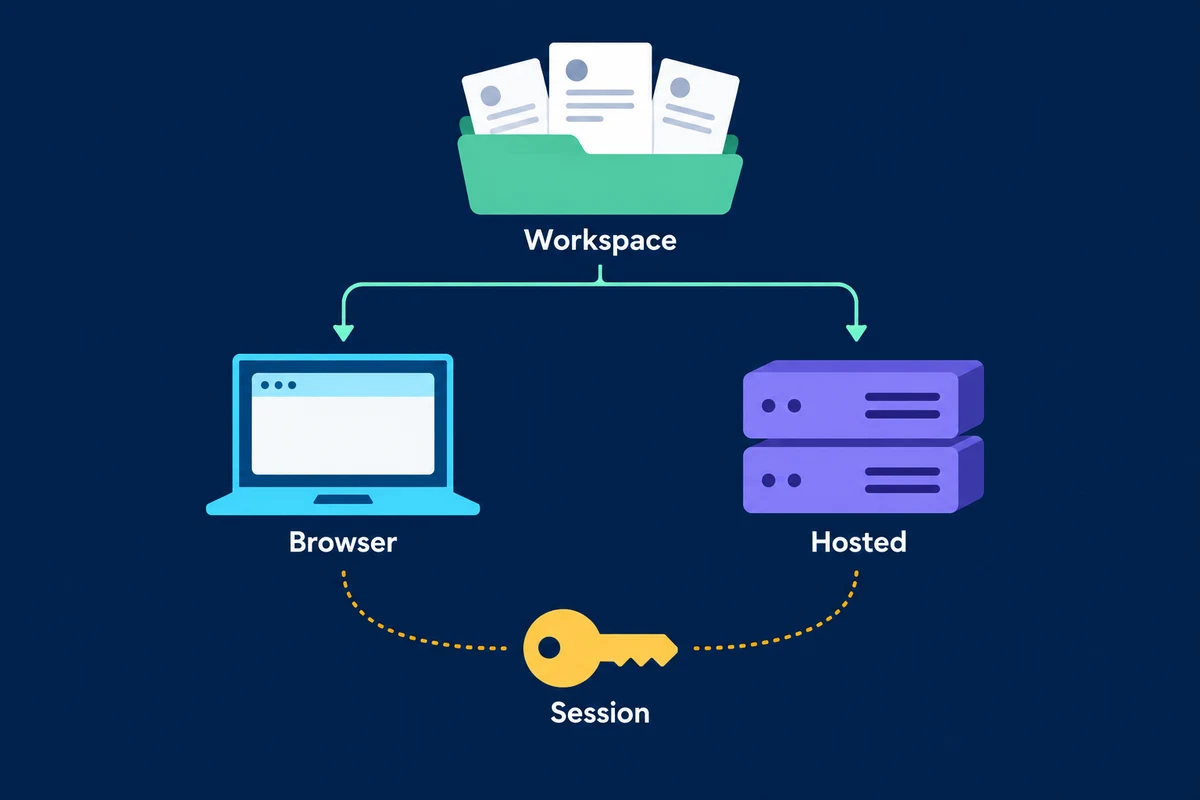
A tool can have a cloud dashboard and still depend on someone's open browser. Another can install a Chrome extension but perform the work on the provider's servers. An agency buying from the label alone can discover the real dependency after the operator closes their laptop.
Before buying either, establish where LinkedIn-side steps run, who holds account access, and what a reviewer can stop or inspect. Hosted execution can remove a local-machine dependency; browser execution may fit work managed at an operator's desk. Neither architecture grants LinkedIn permission or establishes a lower restriction risk.
If your client cannot accept the proposed account access or LinkedIn policy exposure, use native, manual work instead. A feature comparison cannot resolve that objection.
Find the executor behind the dashboard
The workspace is where an operator keeps lists, edits a sequence and reads results. The executor is what actually performs the LinkedIn-side steps. Those can be in different places.
Dux-Soup describes both browser and hosted variants. Its cloud version executes queued actions on its servers while the local computer is off; its browser version needs the local computer running. That is a useful distinction between those variants, not a specification for every product sold as an extension.
LeadShark describes a different arrangement: its Chrome extension obtains session information, while execution happens in the cloud. Here, installing an extension does not mean execution or account access stays on the laptop.
Ask the supplier to explain your proposed configuration, including any companion extension. A dashboard screenshot does not answer these questions:
- Execution location: Request a description of the actual browser, local app or hosted service performing LinkedIn-side steps.
- Connection requirements: Establish which device, browser, signed-in session and provider services must stay available.
- Account access: Find out whether passwords, cookies or other session information are used, and where they go.
- Disconnection state: Inspect the visible pending, completed and uncertain outcomes, plus the documented resume behavior.
Treat an unanswered question as an unresolved purchase condition. Do not fill it with assumptions about what cloud or Chrome normally means.
Resolve permission before comparing convenience
LinkedIn's current automated-activity policy prohibits third-party software, including browser extensions, that scrapes, modifies the appearance of or automates activity on its website. It does not provide a cloud exemption.
The User Agreement also prohibits unauthorized automated access and activity, including adding contacts and sending messages. Section 8 makes explicit permission in separate writing from LinkedIn the relevant exception. A vendor calling its service API-based is not evidence of that permission.
Your client's approval is a separate requirement. It can establish the client's instruction to your agency; it cannot authorize activity on LinkedIn's behalf. A paid LinkedIn subscription and a human approval step do not change that distinction.
The first-page comparisons reviewed for this article contain competing safety and detectability claims, but no independent comparative evidence sufficient to establish that one architecture is safer. Dedicated infrastructure or an undetectable claim cannot be treated as an account-protection guarantee. Low activity volume is not permission, either.
If platform-policy compliance rules out the proposed activity, stop here. If the supplier claims authorization, request evidence covering the particular activity and access method you intend to buy.
Know what access you are giving away
Before connecting an account, find out what the supplier receives, which parties can use it, where it is retained and what happens when access is withdrawn.
The account belongs to the member. Section 2.2 of LinkedIn's Agreement requires password protection and prohibits account sharing or transfer. Section 8.2.1 specifically covers using another person's account through shared login credentials or copied cookies. Agency payment does not transfer ownership of a client's personal account.
That makes the identity of the operator a purchase question. A multi-client agency should know which member's account each configuration uses and what the agency staff can actually do. A shared agency dashboard is not permission to share the underlying LinkedIn login.
Get a written explanation of access withdrawal. It should distinguish stopping future activity, ending the supplier's ability to use the account, and returning or deleting retained prospect data. Those are different outcomes. Removing an extension is not, by itself, evidence that a hosted service no longer has access; conversely, do not assume every product requires the same password-reset procedure.
Review the supplier's documented method with the account holder and your privacy or security reviewer. If it is unclear whether the proposed access complies with your obligations, do not connect a production client account to find out. The broader agency handover guide covers evidence to recover when a provider relationship ends.
Buy a recovery process, not only uninterrupted runtime
Hosted execution may suit work that should not depend on an operator's local machine, provided the actual executor is hosted. It replaces that local dependency with provider-service and account-session dependencies. Ask what happens when either is unavailable and who notices.
Browser execution can suit an agency that wants a named operator present for work and can support the required browser and device. It also places the local environment in the operating process. Ask what stops when the browser closes, the machine sleeps or the session ends. Do not assume that a visible browser means every action is reviewed.
The harder demonstration is reconnection.
Suppose a client changes its brief after the team prepares a list: a region is now excluded, or the message's offer is no longer available. The operator pauses work. Before anything resumes, the reviewer needs to find the affected people and steps, remove or revise them, and understand which activity already happened.
This is an illustrative procurement scenario, not a claim about any vendor's pause controls. Ask the supplier to demonstrate it with sample records and no LinkedIn activity. If the demonstration requires sends or account-risk experiments, request a documented or simulated walkthrough instead.
The demonstration should preserve uncertainty: pending, completed and unknown are not interchangeable. If a disconnection leaves an action's outcome unclear, a reviewer needs a way to resolve it before permitting a retry. An automatic restart that preserves the queue but cannot explain its state is not enough evidence of recovery.
For an agency, this matters across client accounts. Ask whether pausing one client's work affects another, who can resume it, and where the reviewer can see the applicable list and message. Do not infer these controls from a multi-account pricing page.
Put reviewer work into the purchase decision
Use the same client brief and sample records for each supplier's no-send demonstration. Have the intended operator inspect the audience and sequence, identify an unsuitable person, revise a message, pause the work and explain the resume state. Ask for documentation where a control cannot be shown.
A successful demonstration lets the team make and preserve those decisions. A reviewable prospect list may still contain poor matches; an approved message may become stale when the offer changes. The qualification guide deals with the audience judgment that the runtime cannot make for you.
Request a quote for the actual account arrangement: client accounts, agency users, required devices or hosting, support and any commitment. Record the operator work that remains, including review, restoring access and resolving uncertain activity. Without those inputs, the advertised entry prices say little about the cost of supporting client work.
Choose the locally executed option if its verified device requirements fit the operator's working pattern and the agency can support interruptions and review. Choose the hosted option if removing the local-machine dependency is necessary and its access, oversight and recovery conditions are acceptable. When neither clears those conditions, retain native/manual work or postpone the purchase.
Where OutreachGenie's browser companion fits
OutreachGenie's public product facts describe sources, notes, reviewable lists, visible flows and campaign oversight. Its browser-companion description says the Chrome extension performs LinkedIn-side steps under the signed-in session and reports status back to the campaign. The workspace and the browser-side execution have distinct jobs.
That arrangement is relevant if you want to keep the prospect decision and campaign state together. It is not a promise that LinkedIn activity continues with the laptop off, a claim of LinkedIn authorization, or protection against restrictions. Check the browser and session requirements against the operator's process.
Review OutreachGenie's product facts and the prospecting workflow guide before deciding whether that operating model fits your agency. Human review can improve the audience and message decision; it does not make prohibited automation permitted.
Research used for this guide
Try the workflow