
Contact-data purchase test
How to verify LinkedIn contact data before buying a tool
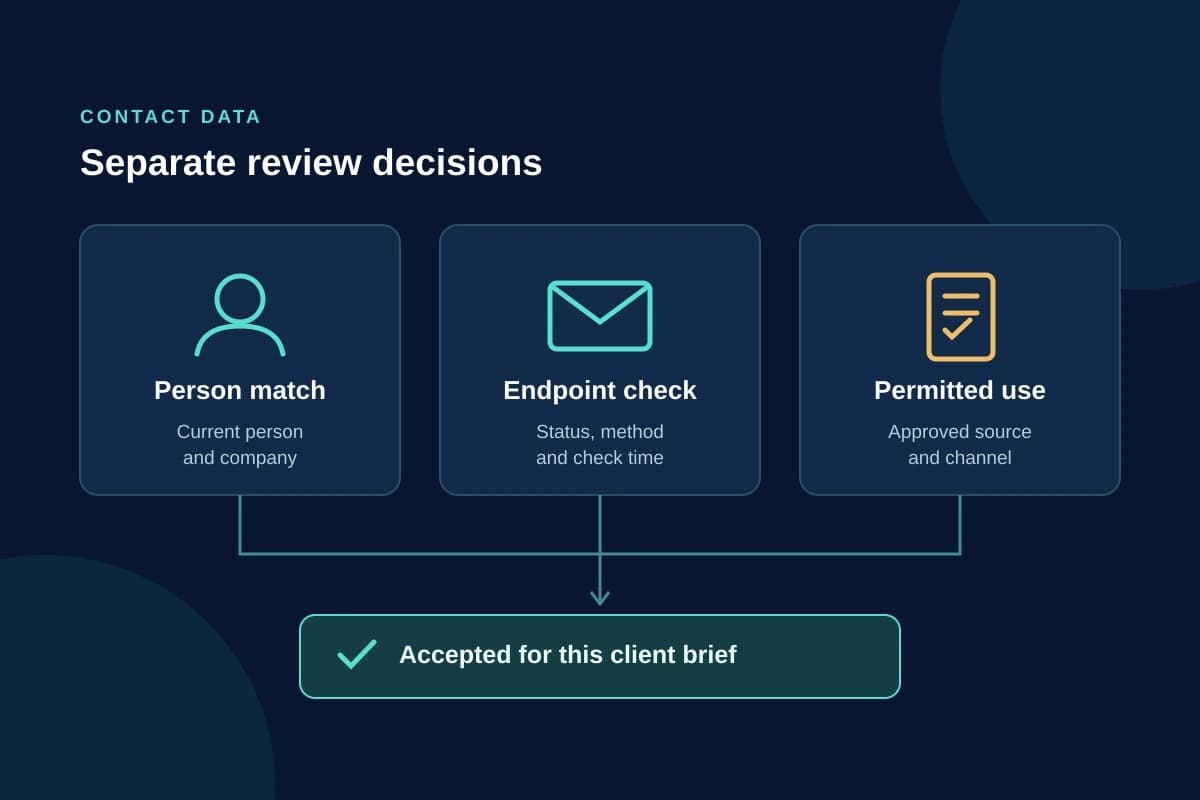
Yes, dedicated email verification tools can check addresses found through a prospecting service. They cannot settle every question about a LinkedIn contact. A mailbox can pass a technical check and still belong to the wrong person, reflect an old employer or be unsuitable for the outreach you intend.
Before buying, ask the supplier what it verifies. Then test its records against one client brief, keeping person matching, endpoint status and permission to use the data as separate decisions. Count the records your agency accepts after review. A count of returned emails is a different number.
Start with the claim hidden inside “verified”
A salesperson's current LinkedIn profile, an email address and a phone number are different objects. A check on one does not authenticate the others.
For example, Hunter documents email checks covering address format, mail-server configuration, mailbox responses and catch-all behaviour. It contacts the server without sending an email. Those checks help assess an address. They do not tell your reviewer that the person still works at the company whose domain appears after the @ sign.
Consider a hypothetical record for a finance director who has changed jobs. The supplier returns an address at the previous employer. That mailbox may still accept mail, perhaps because it forwards or has been retained. Passing the address check would not make it a suitable contact for a campaign aimed at the person's new company.
Ask for the status definition, the check date and the evidence linking the address to the person. “Verified yesterday” is incomplete if yesterday's check concerned only the mail server.
Keep uncertain email results visible
Status names vary by provider. Obtain the supplier's definitions before converting them into your own approved or rejected labels. Hunter's status documentation illustrates why this matters:
- Valid: the address passed the supplier's checks and is reported as able to receive mail. Your reviewer still needs to confirm the intended person, current role and permitted use.
- Accept-all or catch-all: the domain's behaviour prevents confirming the particular mailbox's deliverability. Hold it for review under an explicit uncertainty policy.
- Unknown or blocked: the service could not determine the result. Preserve that uncertainty; do not silently relabel it valid.
- Invalid: the address failed the checks. Exclude it from the accepted email set.
An unknown result is not proof that an address is false. It is also not evidence that the address is ready to use. If a supplier hides these distinctions behind a single green badge, ask to see the underlying export before committing.
A second verifier can be useful for reviewing uncertain results, but agreement between two tools still does not demonstrate ownership. Ask whether they use different checks or simply consult overlapping data sources. Keep disagreements in the ledger instead of choosing whichever result produces the larger list.
A valid phone number is another limited claim
Phone validation needs the same scrutiny. In Twilio's Lookup v2 documentation, the basic valid flag indicates that a number is in a valid range that a carrier can assign. Line status, line type and identity matching are separate data packages with their own coverage and access limits.
A valid-range result therefore does not establish that the line is active or belongs to the intended prospect. “Mobile” describes a line type, not its owner. Ask a contact-data supplier whether its label means format validation, an active-line check, a database match to a named person or something else.
If you do not need phone outreach for the client brief, leave phone data out of the purchase test. Paying for more fields is not useful when the campaign has no reviewed use for them.
Check permitted use before uploading the sample
Do not begin a trial by uploading a client file and sorting out permissions later. Confirm that you may share the sample with the provider, use the intended input method and retain or deliver the returned data under the supplier's contract.
Platform rules are a separate question. LinkedIn's User Agreement prohibits scraping or copying its services through tools such as browser plugins, and prohibits unauthorized automated access and activity, unless LinkedIn explicitly permits the use in separate writing. A supplier's claim that its data is accurate does not resolve that restriction. Neither does a low activity setting.
Marketing rules also depend on the recipient, location and channel. As a UK example, the ICO's business-to-business guidance distinguishes corporate subscribers from sole traders and some partnerships. It also says that publicly available personal data is not automatic agreement to direct marketing. The page is under review following legislative changes, so check the current guidance and obtain advice for your particular campaign rather than treating this paragraph as a legal clearance.
Your sample should exclude suppressed contacts and any records whose intended use has not been approved. Technical validity cannot reverse an objection to contact.
Run one no-send purchase test
Write the client brief before selecting the sample: target role, company criteria, market, intended channel and the data fields actually needed. Use records you are permitted to process. Give each supplier the same inputs through a permitted route, and keep the original sample unchanged so missing results do not disappear from the comparison.
Keep one review row per input prospect. Record the returned endpoint, supplier-native status, check time, matching evidence, current-role confirmation, credits charged and your acceptance decision. When rejecting a row, record why. “Wrong person” and “uncertain mailbox” require different follow-up work.
For person matching, compare the returned name, employer and domain with current professional evidence. If sources conflict, hold the record rather than manufacture a definitive match. A familiar name or a plausible email pattern is not enough on its own.
The test does not need messages or calls. Its purpose is to assess the data and review work before a campaign, not to use prospects as an experiment. It will not measure reply rates, meetings or inbox placement.
At the end, report both the raw returns and the accepted rows. Break out missing contacts, wrong-person matches, old-employer records, duplicates, uncertain endpoints and permission exclusions. These reasons explain whether another provider, more review time or a narrower brief could solve the problem.
No fixed sample size can establish performance for every client. A small trial is a buying screen. If results are close or the failure pattern varies across clients, extend the test before purchasing a large commitment. Do not extrapolate one client's result to the whole agency.
Price the records you can accept
Use the actual spend required to run the workflow, including subscription commitments, data credits, separate verification and review time. Keep cash cost and reviewer hours visible instead of hiding the hours inside an unexplained quality score.
Here is an illustrative calculation, not a supplier benchmark. A test costs £120 and returns 30 email addresses. That is £4 per returned address. If review accepts only 18 records, the cash cost is £6.67 per accepted record, before reviewer time. A success-billed lookup can still be unusable for your brief.
Record how the plan charges for failed lookups, repeat checks, uncertain results and exports. Confirm that the test uses features available in the plan you would actually buy. A trial with a different data package or export limit can misstate the cost of routine work.
Buy when the accepted records and review workload meet the client's requirements at a cost you can support. Decline or investigate further when a supplier will not explain its statuses, preserves no matching evidence or makes permission assumptions you cannot approve.
You may not need a new data tool at all. If existing reviewed contacts or a permitted LinkedIn conversation route already serve the brief, compare that option with enrichment before adding another subscription.
OutreachGenie's role is organizing prospect sources and notes into lists, not verifying email addresses or phone numbers. Use that context when qualifying reviewed leads for outreach. An address that passes a technical check still needs a reason to be in the client's campaign.
Research used for this guide
Try the workflow