
LinkedIn InMail credits: how many you get on each plan (2026)
InMail credit allowances and cost
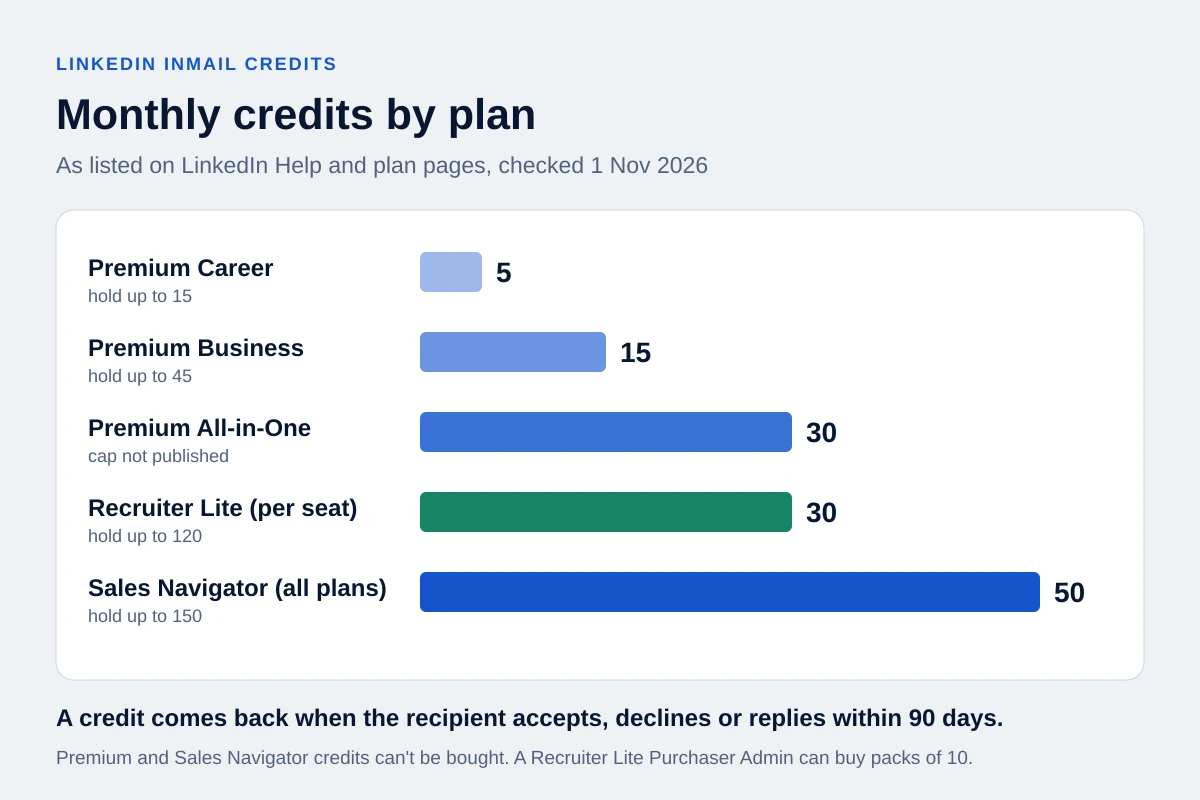
LinkedIn gives 5 InMail credits a month with Premium Career, 15 with Premium Business, 30 with Premium All-in-One, 50 with any Sales Navigator plan and 30 per Recruiter Lite seat. A credit comes back when the recipient accepts, declines or replies within 90 days. You can't buy extra credits on Premium or Sales Navigator; only Recruiter accounts can buy more.
Every number below comes from a LinkedIn Help or LinkedIn plan page, checked on 1 November 2026. Where LinkedIn's own pages disagree or say nothing, this guide says so instead of filling the gap.
How many InMail credits do you get on each LinkedIn plan?
| Plan | Credits per month | Most you can hold | When credits arrive | Can you buy more? |
|---|---|---|---|---|
| Premium Career | 5 | 15 | First day of your billing cycle | No |
| Premium Business | 15 | 45 | First day of your billing cycle | No |
| Premium All-in-One | 30 | Not published | Not published | Not published for this plan; LinkedIn's general Premium rule is no |
| Sales Navigator Core, Advanced, Advanced Plus | 50 per user | 150 | 1st of each month (UTC) | No |
| Recruiter Lite | 30 per seat | 120 per seat | Your renewal cycle | Yes, packs of 10, up to 70 extra per seat |
Sources: the credits and renewal page for Premium, Sales Navigator and Recruiter Lite allowances and caps; the Sales Navigator credits page for the 1st-of-month UTC grant and "the same number of credits" on every Sales Navigator plan; the All-in-One plan page for its 30 credits; the Recruiter credit page and Recruiter Lite purchase page for seats and packs.
A few details the table can't hold:
- All-in-One is new. LinkedIn's plan page says it is "currently rolling out and available to select users." It does not publish a cap or a renewal rule for it. Some articles quote a cap of 90; that is an estimate, not a LinkedIn figure.
- Premium renews on your sign-up date. Credits arrive on the first day of your billing cycle, shown on your My Premium page. Sales Navigator ignores the billing date and grants credits on the 1st of each month in UTC.
- Hiring Pro is different. It gives up to 5 credits per job, tied to candidates it recommends, not a monthly balance.
- No plan is unlimited. LinkedIn says it doesn't currently offer a plan with unlimited InMail credits.
To check your balance on Premium, go to Me, then Premium features, then See all features, and open the InMail section, where LinkedIn shows credits available (balance guide). On Sales Navigator, the balance is on the Settings page.
Do unused InMail credits roll over?
Yes, up to the cap. Unused Premium credits carry into the next month until you hold the maximum for your plan: 15 on Career, 45 on Business. Sales Navigator credits also roll over up to 150, but the Sales Navigator page adds that carried-over credits "must be used within 90 days."
LinkedIn does not publish a 90-day expiry for Premium credits. Several vendor articles apply it to every plan; the help pages don't.
Recruiter Lite has a sharper edge. Purchased credits never expire, but a seat can't go above 120 at renewal. If a seat holds 115 when the cycle renews, it receives 5 new credits and the other 25 are skipped for good, according to the Recruiter Lite purchase page.
When does LinkedIn give an InMail credit back?
You get the credit back when the recipient accepts, declines or replies within 90 days of your InMail. A pending InMail counts as neither. Quick Replies count as a response.
The Sales Navigator page adds three rules that matter in practice:
- Auto-replies count. "Interested" and "Maybe later" count as accepted, "Not interested" counts as declined, and all three return the credit immediately.
- You can edit or delete an InMail only within 60 minutes of sending it.
- Deleting an InMail that hasn't been answered does not return the credit.
So a refund is not a good sign on its own. A "Not interested" gives you the credit back and ends the conversation. Count credits and outcomes separately, as the InMail vs connection request guide explains.
Can you send a second InMail before they reply? LinkedIn's pages disagree. The general credits page says you can't send another InMail to that member until they respond. The Sales Navigator page says a second InMail before a response uses another credit. Both say the recipient gets an automatic reminder within three days, so a manual chaser adds little. Check what your own product allows, and don't treat either rule as a reason to keep writing to someone who has declined.
Can you buy more InMail credits?
Not on Premium or Sales Navigator. The InMail overview says it's not possible to buy credits outside the monthly allotment, and the Sales Navigator page says you can't purchase additional credits. Articles that offer extra Premium or Sales Navigator credits at around US$10 each are wrong.
Recruiter accounts can. On Recruiter Lite, the Purchaser Admin buys packs of 10, up to 70 extra credits per seat, and those purchased credits never expire. LinkedIn's Recruiter, RPS and RPS+ contracts can also buy extra credits. LinkedIn does not publish a price for any of these packs.
Is LinkedIn raising InMail to $21 each?
There's no LinkedIn source for it. A recruiting thread and a few LinkedIn posts claim per-InMail prices are rising from about US$3 to US$21. LinkedIn's help pages don't publish a per-credit price for any plan, and the Recruiter Lite purchase page sends you to the purchase screen in your account for pricing. Until LinkedIn publishes a number, treat any per-credit price you read as a third party's estimate or a quote for one contract.
How much does one InMail really cost?
Dividing the subscription by its credits gives the most quoted number. Sales Navigator Core costs US$119.99 a month on monthly billing (plan page), so 50 credits work out at about US$2.40 each. Premium Business at US$69.99 a month (plan page) gives about US$4.67 per credit.
That number ignores refunds and the reason you write in the first place. The table below follows one month on Sales Navigator Core. The response rate and positive share are illustrative assumptions, not benchmarks; replace them with your own.
| Step | Arithmetic | Result |
|---|---|---|
| Monthly price, Core, monthly billing | Plan page | US$119.99 |
| Price per credit, ignoring refunds | 119.99 ÷ 50 | US$2.40 |
| InMails sent in the month (assumed) | Assumption | 60 |
| Responses at an assumed 20% response rate | 60 × 0.20 | 12 |
| Credits returned for those responses | 1 per response | 12 |
| Net credits used | 60 − 12 | 48, within the 50 granted |
| Cost per InMail sent | 119.99 ÷ 60 | US$2.00 |
| Cost per response | 119.99 ÷ 12 | US$10.00 |
| Positive replies, assuming 25% of responses are positive | 12 × 0.25 | 3 |
| Cost per positive reply | 119.99 ÷ 3 | US$40.00 |
Illustrative arithmetic only, not observed results or a benchmark. It assumes responses arrive early enough in the month to reuse their credits.
On annual billing, Core is US$1,079.88 a year, or US$89.99 a month. The same assumptions give US$1.50 per InMail sent and US$30.00 per positive reply.
Two corrections cut in opposite directions. If you bought Sales Navigator mainly for search, saved leads and alerts, charging the whole price to InMail overstates its cost. If you count the time spent researching each person and answering replies, the real cost per positive reply is higher than the table shows.
Can you use Premium InMail credits in Sales Navigator?
No. Premium credits can't be used on Sales Navigator or Recruiter, and Sales Navigator users can send InMail only from Sales Navigator, not from LinkedIn.com (Sales Navigator InMail overview). Each pool stays with its product.
Switching or cancelling resets the balance:
- Cancel Premium, and your InMail balance goes to zero.
- Upgrade Premium, and existing credits don't transfer.
- Cancel Sales Navigator or change its plan type, and credits don't transfer.
Use your balance before a planned change. The help pages cited here don't say what happens to replies in a Sales Navigator inbox after you cancel, so save any conversation you need first.
How can you message someone on LinkedIn without InMail credits?
LinkedIn's messaging guide lists the free routes to people outside your network:
- Open Profile. Premium members who turn on Open Profile can be messaged for free, and no credit is used. LinkedIn limits "the number of Open Profile messages you can send in a given time period" (Open Profile page) and publishes no number. The "800 free Open Profile InMails a month" figure that circulates on forums has no LinkedIn source.
- Shared Group or current coworkers. You can send a message request to a member of a LinkedIn Group you're both in, or to a current coworker.
- A connection request. Once accepted, ordinary messages to a 1st-degree connection are free. A note on the invitation is optional, and the free allowance of notes is limited.
- Event attendees. LinkedIn's help pages don't describe a free messaging rule for event attendees. The weekly figures some tools quote come from vendors, not LinkedIn.
LinkedIn also limits how many messages a member can send in a time period, without giving a number, and members can switch off InMail, Open Profile and Sponsored messages. Which route fits depends on why you're writing; the InMail vs connection request guide compares them on eligibility, timing and outcomes.
How long can an InMail be?
On LinkedIn.com, the subject line can be up to 200 characters and is optional, and the body can be up to 2,000 characters, per the InMail overview. Many guides still quote 1,900, an older limit. The Sales Navigator page gives no figure. Sales Navigator lets you attach files up to 200 MB, and each InMail goes to one person; there's no bulk send.
Short messages did better in LinkedIn's own recruiting data. Its Talent Blog analysis of corporate-recruiter InMails from May 2021 to April 2022 found messages under 400 characters got about 22% more responses than average, and those over 1,200 characters about 11% fewer. That is relative recruiting data, not a sales benchmark. To check a draft against the subject and body limits, paste it into the LinkedIn character limits checker.
Can you tell if someone read your InMail?
No. LinkedIn's read receipts page says read receipts and typing indicators don't appear to senders of InMail. For message requests, receipts appear only after the recipient accepts. Silence tells you nothing about whether the message was opened.
Is LinkedIn InMail worth it?
It can be, when you have a specific reason to write to someone outside your network and no free route reaches them. The evidence LinkedIn publishes is thin, so judge it on your own cost per positive reply.
- A LinkedIn Sales Solutions page gives a 10% to 25% response rate, "300% higher" than email with the same content. The page is undated, its URL points to 2019, and it gives no method.
- A 2023 Sales Blog analysis of 2022 Sales Navigator InMails reports relative lifts with no baseline: 87% higher acceptance with a complete sender profile, 62% when the recipient moved to a new company in the last 90 days, and 45% when they had posted in the past three months.
- The recruiting data above counts any reply within 30 days, negative ones included. About 65% of responses arrived within 24 hours and 90% within a week.
None of these figures separates positive replies from "no thanks." A response returns your credit either way. If your positive share is low, a cheaper plan or a free route may produce the same conversations.
Why can't I send an InMail when I have credits?
Check these causes, each based on LinkedIn's help pages:
- The recipient has turned off InMail in their message preferences.
- An earlier InMail to the same person is still pending (the general rule on Premium).
- You're on LinkedIn.com with Sales Navigator credits. Sales Navigator InMail is sent only from Sales Navigator.
- Your credits belong to another product. Premium credits don't work in Sales Navigator or Recruiter.
Where OutreachGenie fits
OutreachGenie does not send InMail. Its Send message and Message sequence actions work with 1st-degree connections only; they are not InMail or Open Profile senders, and they don't use your credits. Keep paid InMail in the LinkedIn product that holds the credits.
If you go the connection route instead, a flow can hold the message until LinkedIn shows the invitation as accepted, using the When user accepts step. LinkedIn prohibits third-party tools that automate activity on its website and can restrict accounts that use them, so weigh that before adding any tool to your outreach.
Research used for this guide
- InMail credits and renewal process | LinkedIn Help
- InMail credits in Sales Navigator | LinkedIn Sales Navigator Help
- InMail messages overview: limits and purchasing | LinkedIn Help
- Check your InMail credit balance | LinkedIn Help
- InMail in Sales Navigator overview | LinkedIn Help
- Recruiter InMail credits per seat | LinkedIn Help
- Buy additional InMail credits in Recruiter Lite | LinkedIn Recruiter Help
- Premium All-in-One plan and InMail credits | LinkedIn
- Premium Business plan, price and InMail credits | LinkedIn
- Sales Navigator plans and prices | LinkedIn
- Messaging people outside your network | LinkedIn Help
- Open Profile messages | LinkedIn Help
- Read receipts and typing indicators | LinkedIn Help
- InMail response rates (undated, no method given) | LinkedIn Sales Solutions
- Recruiter InMail response data, May 2021 to April 2022 | LinkedIn Talent Blog
- Sales Navigator InMail acceptance data for 2022 | LinkedIn Sales Blog
- Automated activity on LinkedIn | LinkedIn Help
Compare InMail with a connection request
Next step